Goldsrc Engine Initialization Process
Description of the initialization process of the Goldsrc engine.
In the GoldSrc engine, most of the code runs on a single thread. Therefore the general code flow is very linear and easy to comprehend. When it comes to initialization code, there is no difference, and the whole initialization code runs on a single thread.
In this article I'd like to cover some of the steps that take place during initialization in the 8684 build, including some of the internal details of the code. Like which functions are called, what subsystems are initialized, in which order, why do they exist, and so on.
Here is a simplified diagram of what will be covered in this article.

Let's now go through each of the steps in the initialization, starting with the launcher entrypoint.
WinMain: The Very Beginning
At this point, the engine dll is not even loaded, the game window is not visible, and not much is happening. Everything takes place inside the WinMain entry point function in the launcher module. The WinMain function is used here without much surprise because all graphical programs on Windows start with this routine.[1]
This function is responsible for bootstrapping the essential DLLs such as FileSystem_Stdio.dll, and mainly the engine dll. Either hardware-accelerated engine or the software engine is used, depending on user preferences, which got saved into the registry the previous run. If hardware engine is used (the one using GPU-accelerated rendering), the hw.dll module is loaded into memory. sw.dll is used otherwise.
Obviously, they need to be a separate DLLs, since users without any graphical cards might not even have the necessary DLLs installed (e.g. opengl32.dll or D3D7). However, under the hood, the engine is one Visual Studio project, and a macro called GLQUAKE is used to distinguish between the two. Yes, you heard that right, "quake" is used to refer to the OpenGL engine. Perhaps a leftover from the Quake 1 and Quake 2 engines, which the engine uses plenty of code from.
The Encrypted Engine dll
Fun fact, actually between builds 2XXX—3XXX, the engine dll was actually stored on disk using a proprietary executable format developed by Valve around 2002—2006 IIRC, which they've referred to in code as "Blob". This file format used a simple header, and then the actual executable code, along with sections. The sections and the code were "encrypted" via xorring the buffer with a key.
In summary, the encryption is very easy to reverse, since the launcher for these old builds literally contained the loader code, along with the decryption algorithm, so it was very easy to deduce what is going on.
I've actually written a decryptor for this format, and it can be found here on GitHub.
Code Flow Jumps Into The Engine
After the basic launcher initialization and bookkeeping has finished, it's now time to load the engine module. As previously said, the engine dll is picked based on the user preferences, and that dll is loaded into memory as usual.
After the engine module has been loaded, the launcher locates engine's factory via exported function CreateInterface that returns pointer to the desired interface exported by the engine. This is used to locate the IEngineAPI interface, identified under string VENGINE_LAUNCHER_API_VERSION002. This interface implements the entrypoint for the engine.
Currently, the interface contains a single method called Run, with a few arguments, which are populated by the launcher. The launcher calls the Run method, passing essential arguments such as the instance handle, base directory of the hl.exe executable, command line arguments, and the launcher and filesystem factory.[2]
// Interface declaration
class IEngineAPI : public IBaseInterface
{
public:
    virtual EngineRunResult Run(void* instance, char* basedir, char* cmdline, char* postRestartCmdLineArgs,
                                CreateInterfaceFn launcherFactory, CreateInterfaceFn filesystemFactory) = 0;
};

// Launcher code
IEngineAPI* engineAPI = (IEngineAPI*)engineFactory(VENGINE_LAUNCHER_API_VERSION, NULL);
if (engineAPI)
{
    engineResult =
        engineAPI->Run(hInstance, UTIL_GetBaseDir(), (char*)CommandLine()->GetCmdLine(),
                       szNewCommandParams, Sys_GetFactoryThis(), Sys_GetFactory(filesystemModule));
}
The EngineRunResult type contains states to deal with when the engine is restarted. For example for a change of video mode result is ENGINE_RESULT_RESTART.
CEngineAPI::Run: Beginning inside the Engine dll
Now we're inside the engine dll's Run function. The first thing that happens here is that a Steam BreakPad Crash Handler is registered via SteamAPI_UseBreakpadCrashHandler, along another handler for Structured Exceptions using _set_se_translator, which is called when a Structured Exception occurs. This is to log application crashes, and I assume this was added when steam support was added to the engine.
After that, another function RunListenServer is invoked, and this is where the real fun begins. Up till now, the IEngineAPI interface was used because this interface is also implemented by the dedicated server, which is basically the same engine, but with a few changes to make it work as a server. But, after that, the RunListenServer routine is the real entrypoint for the game engine.
In this function, each subsystem is initialized and finally the main game loop is ran. That includes video, cvars, sound, etc. Let's now go through each one.
CSteam3Client::InitClient: Steam Initialization
One of the first major things that take place is the Steam initialization code. A function is called that takes place within the sv_steam3.cpp source file, and that function is CSteam3Client::InitClient. This is the function that calls into steam_api.dll API, which is a thin wrapper over proprietary steamclient.dll, which is actually embedded in Steam or exposed via pipe. I've reversed the steam_api module.
This is where the infamous steam_appid.txt file is created. Also, the infamous error when you run hl.exe without Steam is also defined here:
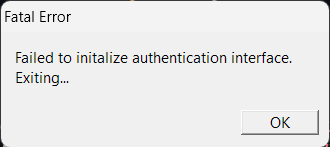
When SteamAPI_Init is called within the CSteam3Client::InitClient function, initialization fails due to a missing registry key. Specifically, the function expects the key pid under Software\Valve\Steam\ActiveProcess to contain the process ID of the running steam process. The pid value in this key represents the last running Steam process. If it's missing or points to a non-existent process, the call to OpenProcess fails.
// Try to get steam process process id from registry
GetRegistryValue("Software\\Valve\\Steam\\ActiveProcess", "pid", (LPBYTE)&dwSteamPID, cbData);
// Open steam process and query informaton from it
hProcess = OpenProcess(PROCESS_QUERY_INFORMATION, NULL, dwSteamPID);
if (!hProcess) // Not running
{
    return false;
}
However, this version of steam_api.dll used in GoldSrc is old, and nowadays the setup might differ.
If the Steam is running, the code proceeds with other initialization such as:
- Getting pointers to various interfaces (ISteamUtils, ISteamApps, ISteamUser, etc.)
- Setting system-wide environment variable
SteamAppIdto the current AppId. - Setting up breakpad and minidumps (for application crashes).
- Setting up the callback manager.
- And game overlay.
VideoMode_Create: Video Initialization
In this stage of initialization, video modes are processed. This takes place inside VideoMode_Create function. Common launch options such as -window, -full, -gl, or -d3d are processed here. Of course, the D3D renderer is absent in the steam version of the engine, but before it was part of this function, so I thought it would be good to mention it here.
At this point, the developers of this code decided to use a nice inheritance paradigm, which allows for development of multiple video modes in a friendly structured way. There is one parent class CVideoMode_Common (that is the concrete implementation of IVideoMode interface) that serves as the basis for subsequent video mode implementations (see below).
IVideoMode
  CVideoMode_Common
    CVideoMode_OpenGL
    CVideoMode_Direct3DFullScreen
    VideoMode_Direct3DWindowed
    CVideoMode_SoftwareFullScreen
    CVideoMode_SoftwareWindowed
Each implementation uses its set of underlying API to do the job. What do these classes implement? In short, the methods of the IVideoMode interface—for instance, if you specify that you want to run the OpenGL engine, the engine picks the CVideoMode_OpenGL class, if you chose software engine, it picks one of the CVideoMode_Software* classes.
Video Modes Generation
The engine uses video mode generation dictated by SDL.[3] Each mode represents one valid resolution of the game window, along with the color depth. The engine then creates a list of all possible video modes. This list then can be seen within the video tab of the options menu in game.
The game supports 32 video modes at max, and they are sorted by priority. See SDL_GetDisplayMode and SDL_GetNumDisplayModes functions for more information.
Rendering the Game Menu Background
The game menu background is actually rendered here. The CVideoMode_Common::DrawStartupGraphic function takes the responsibility of rendering the individual tiles that compose the menu background.
Actually, before it is rendered, the TGA tiles must be loaded from disk in CVideoMode_Common::LoadStartupGraphic function. This function parses the resource/BackgroundLoadingLayout.txt file, which contains the information about the tiles that compose the background.
Then, these tiles are painted once onto the background.
The Startup Graphics
In the original version of the game at startup a video is played showing the Sierra Logo and then the Valve logo in a brief intro That was later removed from the game and now, at HL25 added back once again.
However, in the 8684 version, the code for this is simply not there.[4]
Sys_InitGame: Engine Initialization
At this point, most of the internal engine subsystems are initialized. This happens in Sys_InitGame in sys_dll2.cpp function.
Next up is parsing of liblist.gam file. This file is a simple key-value store, and is parsed only once during initialization. It dictates which client and server DLLs are supposed to be loaded, among other mod-specific configurations.
Then, the engine timer is initialized. On Windows, the engine uses QueryPerformanceCounter to query the current time. That is done in Sys_Init.
Along with that, the user can specify a launch option -starttime, that will start the game at a specific time. I don't know why that would be needed, in any case, but it's there.
Sys_InitMemory: Memory Pool Allocation
After that, the engine memory pool is allocated. Obviously, as this code was written in the 1990s, the memory management is very simple and limited. A memory pool of fixed size is allocated for the engine allocator, which is used for all dynamic resources.
You can actually receive a funny error message if you have low enough memory, which actually never seen the light of the day:
if (memorySt.dwTotalPhys < FIFTEEN_MB)
{
    Sys_Error("Available memory less than 15MB!!! %i", host_parms.memsize);
}
I would be not kidding, if I would tell you that the memory limits the engine dictates are within 15 and 128MB. You literally cannot allocate more memory than 128MB, because of a hardcoded check.
if (host_parms.memsize > MAXIMUM_WIN_MEMORY)
{
    host_parms.memsize = MAXIMUM_WIN_MEMORY;
}
These are the actual limits used within the engine.
// Memory limits
#define FIFTEEN_MB                       (15 * 1024 * 1024)
#define MAXIMUM_WIN_MEMORY               0x8000000 // ~ 128 MB
#define MINIMUM_WIN_MEMORY               0x0E00000 // ~  14 MB
#define WARNING_MEMORY                   0x0200000 // ~   2 MB
#define DEFAULT_MEMORY                   0x2800000 // ~  41 MB
#define MAXIMUM_DEDICATED_MEMORY         0x2800000 // ~  41 MB
#define LISTENSERVER_SAFE_MINIMUM_MEMORY 0x1000001 // ~  16 MB
GL_SetMode: FBO setup and QGL_Init
Function pointers for OpenGL functions are setup in QGL_Init, which is a kilometer-long function with a lot of GetProcAddress statements, that load the OpenGL functions. This is a common Quake paradigm, so that multiple potential renderers can be supported, without completely being rewritten for different API. This was most commonly used for a translation between D3D and OpenGL.
Apart from that, this code sets up the Framebuffer Object (FBO) containers for scaling up the screen in stretch-aspect mode in fullscreen and enables MSAA. This is essentially just a post-processing layer, that gets applied over the rendered scene after engine rendering is done each frame. Functions like GL_BeginRendering and GL_EndRendering handle FBO binding and unbinding.
This modernization layer was introduced in the 2013 SDL/Linux update by Valve to support newer rendering features on top of the fixed-function pipeline. If -nofbo is specified, this won't be used.
Introducing FBOs is sort of a hack to introduce post-processing into the original GoldSrc rendering pipeline, which without FBO would not be easy to implement.
The fallback (non-FBO) path renders directly to the backbuffer using classic glBegin/glEnd-style immediate mode OpenGL, as per GoldSrc’s Quake heritage.
Host_Init: The Engine Core Initialization From the Quake Days
This function originates from the Quake days, and it marks another important milestone in the engine initialization process. This function contains most of the core engine initialization code. Some minor out-of-place things get initialized right here in this function like some global variables, but usually each engine subsystem (renderer, client/server, pmove, delta, ...) has its own initialization routine.
These out-of-place things include Cvars registration, cmds creation, CBuf allocation, gamma table building, and endianness testing to initialize swap functions in the COM interface (COM for Common).
The networking is setup—both net_message and in_message are allocated. Code for netgraph is also initialized. Delta definitions are created, for deltaing the packets.
Then, steam.inf is parsed, which may look like this (see below). This information is stored and then used e.g. in version or status commands.
PatchVersion=1.1.2.7
ProductName=cstrike
Let's now go through each notable subsystem that gets initialized here. There are plenty.
R_InitTextures: The CheckerBoard Texture
Inside Host_Init, function R_InitTextures is called (Yeah I know, very intuitive naming used here, right?). This function is responsible for creating the artificial checkerboard texture r_notexture_mip. This texture pixels are constructed in code.
for (m = 0; m < MIP_LEVELS; m++)
{
  clrbuf = (byte*)r_notexture_mip + r_notexture_mip->offsets[m];

  for (y = 0; y < (16 >> m); y++)
  {
    for (x = 0; x < (16 >> m); x++)
    {
      if ((y < (8 >> m)) ^ (x < (8 >> m))) *clrbuf++ = 0x00; // first palette entry
      else                                 *clrbuf++ = 0xFF; // last palette entry
    }
  }
}
The pixels are set in a checker-board pattern to the first and last palette index. How does the palette looks like is not known at this point in time however, is later revealed in R_UploadEmptyTex (discussed later).
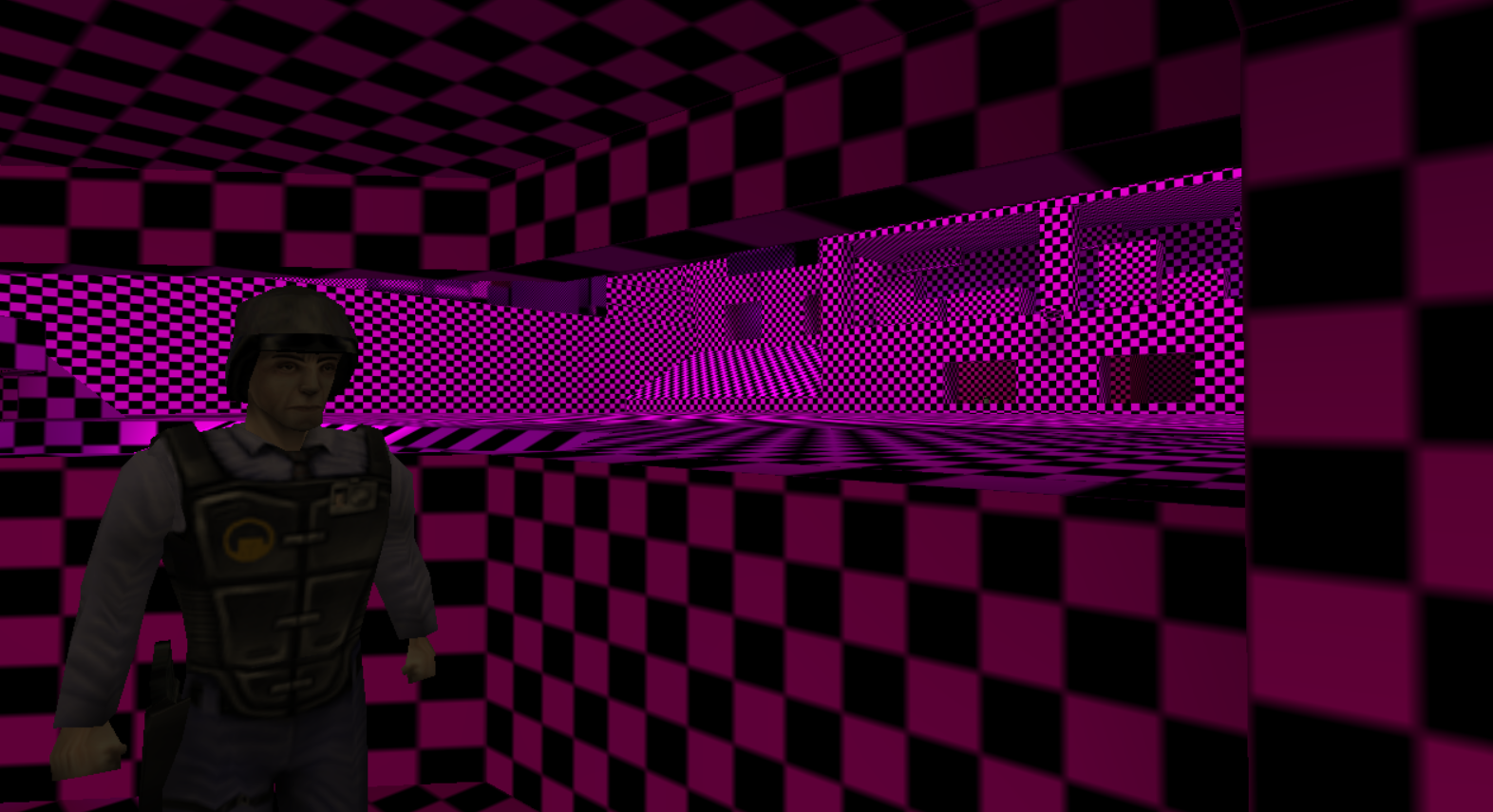
Other than that, this fallback texture is then used in Mod_LoadTexinfo when loading textures if the textures of a model cannot be loaded for some reason.
GL_Init: OpenGL Initialization
Honestly, the naming in GoldSrc is a messy piece of sh*t 😅, lets be honest here. But, by reading the code, we can still deduce what is going on here. This function, GL_Init, is used to query vendor strings, versions, extensions, etc. This function actually outlived the relatively "new" FBO code, since that was added around 2013. So, it makes kind of sense here, that this function's name is GL_Init, since before this was indeed the only "GL" initialization method.
If -glext is specified, OpenGL extensions will be printed to the console unless developer cvar is set to any other value than 0.
The GoldSrc renderer uses some OpenGL extensions (most likely introduced in 2013 in code). Notable are the GL_ARB_multitexture and GL_SGIS_multitexture extensions. These extensions provide a "modern way" (for the OpenGL 1.2 standards) of applying multiple textures to a single surface. GoldSrc uses fixed-pipeline rendering, so there is no GLSL code.[5]
GoldSrc needs at least 3 textures that can be overlapped for Detail Textures, a concept which is used in the game to add more detail to world surfaces.
OpenGL is messy, old, and obsolete. Vulkan is now considered its modern replacement, designed to address the limitations of OpenGL.
A noteworthy fact is also that GoldSrc at some point used the ATI Truform tessellation technology, which was used to tessellate studio models on the GPU. This feature is not present in modern engines, and was made obsolete a long while ago. Two cvars ati_subdiv and ati_npatch were used in CS 1.6 for this. Tesellation only worked on Radeon 8500+ cards. A custom R_GLStudioDrawPointsATI function was implemented to complement for this.
VGui_Startup: VGUI (Valve GUI)
VGUI is the Valve GUI framework. Initially, VGUI1 used in Half-Life 1, and then VGUI2 used in early Steam and then Half-Life modes such as CS, DOD, etc. VGUI2 is far more robust and built for scalability. VGUI2 was later used for both CSS, and even in CSGO.
Even in GoldSrc, the VGUI2 system is pretty robust, because at that time, it was developed for early versions of Steam, which required robust GUI solutions. The code was simply copied over to GoldSrc, and left there. Of course at some point, this has stopped, and therefore GoldSrc contains some unique implementations of some of the GUI controls.
The engine code which initializes this framework is contained within the CBaseUI class, which implements the IBaseUI interface. This interface is rather simple, providing only a handful of methods. Most notable are the Initialize and Start methods.
In this section, I will cover only the high-level details of the VGUI2 initialization in the engine. I will split this into two stages: Initialization and Start stage (as denoted by the functions).
BaseUI Initialization
At initialization stage, bookkeeping work is done. That includes for instance loading the vgui2.dll module, and initializing the vgui_controls library. This library is a collection of reusable UI elements that basically compose the GUI.
Along with the vgui2 dll, chromehtml.dll is loaded, which is essentially just an embedded chromium browser. Valve uses a custom version of Cef (slightly modified) and chromehtml is used to provide an interface for this browser. This is an early version of what can also be found in the GameOverlay on Steam (the built in browser there).
Next GameUI.dll is loaded. This module builds on top of vgui_controls and uses its UI elements to build the game UI. For example, the whole options dialog, including keybindings, video settings, and more are implemented here. Also the "New Game" dialog is implemented in here, and similar dialogs.
BaseUI Startup
When CBaseUI::Start is called, some of the main VGUI2 panels are created. One of them being the Main Static Panel, which is the topmost parent panel.
Then, two derived panels are created based on the Main Static Panel. These panels are the BaseClientPanel and BaseGameUIPanel. As the names suggest, they are the panels for Client dll Panels and GameUI Panels. GameUI is rendered on top of client panels, always. For example, the CStrike scoreboard won't be drawn over the game settings dialog.
Following the panel creation, GameUI is initialized, then the Client dll UI, then the Game Console, and if -console is specified, the Console UI is automatically enabled.
And this is pretty much it for VGUI2 initialization, without going into much details. Of course, the VGUI2 system is very comprehensive, and many of the features weren't discussed here. But hopefully, this gives at least somewhat of a picture about the whole process.
R_Init: Internal Renderer
Functions with prefix R_ represent the internal renderer code. Following the initialization chain, R_Init is the next called function.
Like all others, this function creates a bunch of commands and cvars that are related to this subsystem. Just to show how messy the GoldSrc is, remember the multitexture support code in GL_Init? Well, that code initialized global variable gl_texsort. Which is completely fine, but this same variable is reassigned here in R_Init! For little reason.
if (gl_mtexable != NULL)
{
    gl_texsort = FALSE;
    Cvar_SetValue("gl_overbright", 0.0f);
}
This is what makes the code look messy and hard to follow—one global variable is created and clearly assigned in one function only to be then used in completely different place again. This if-statement could be definitely used in the code before, in one place.
Some of the renderer-related resources are allocated here, including particles, and actually, the checkerboard texture is touched here again in the R_UploadEmptyTex function.
void R_UploadEmptyTex()
{
  byte palette[BMP_PAL_SIZE];
  Q_memset(palette, NULL, sizeof(palette));

  // Artificial color for the checkerboard texture.
  palette[BMP_PAL_SIZE - 3] = 0xff;
  palette[BMP_PAL_SIZE - 2] = 0x00;
  palette[BMP_PAL_SIZE - 1] = 0xff;

  // Load the texture and assign texture number.
  r_notexture_mip->gl_texturenum =
    GL_LoadTexture("**empty**",
    /* type   */   GLT_SYSTEM,
    /* width  */   r_notexture_mip->width,
    /* height */   r_notexture_mip->height,
    /* pixels */   (byte*)r_notexture_mip + sizeof(texture_t), // First mip texture data at here.
    /* mipmap */   TRUE,
    /* txtype */   TEX_TYPE_NONE,
    /* paldata*/   palette);
  }
Now it should make sense. All 256 palette colors are initialized to black, while the last entry is initialized to purple! Hence the checkerboard texture color. This texture is always loaded, and is given a name **empty**, which is just a placeholder.
GL_LoadTexture loads the texture and stores into the texture pool in gltextures array. GoldSrc uses a limit of 4800 textures. This limit is hardcoded.
S_Init: Sound
Here comes the fun part. The sound subsystem is rather complex. GoldSrc supports DSound, and Wave sound on Windows. However, there is another hidden sound subsystem, which is hidden in modern engine versions under the #ifdef __USEA3D macro. This actually refer to A3D Sound, that got dropped IIRC in the 2013 SDL update made by Alfred Reynolds.
Although there were efforts to reverse the GoldSrc engine (many of them successful), AFAIK, noone reversed A3D. Well.. Except ... (Fill out the blank for yourself). So we can discuss it at least briefly here.
Apart from A3D, the engine also fully implements EAX, which is also disabled under a macro _ADD_EAX_.[6]
There is enough evidence that both A3D and EAX are clearly taken from the proprietary version of Quake 2 engine, whose code was never made public. It's surprising that even after so many years, the A3D code remains still proprietary, and there are literally no leaks of it online.
There are also other features in the engine that are based-on or taken away from the Quake 2 engine. This can be also seen in the original predefined macros used in the engine project where QUAKE2 is defined in project settings. So clearly, Valve continued their partnership with id Software and were collaborating with them, at least around 2000's.
Messy Code Once More
It is not a surprise at this point that GoldSrc is a messy (sometimes bloated) place. This is no exception in the sound code, with here this being a lot of #ifdefs. For Windows, for A3D, and for EAX.
So theoretically, if you would have the engine that supported A3D (e.g. 4554 or 3266), you could initialize the sound with A3D instead of DSound or WaveSound. For that, you'd need to set the s_a3d cvar to 1, which would then trigger the init. And then, you should see string "Initializing Aureal A3D...\n" in the console.
Manual A3D initialization can be also triggered using the s_enable_a3d and s_disable_a3d cvars. Let's now discuss the A3D initialization code in more detail..
A3D Initialization
A3D is initialized fist in SNDDMA_InitA3D, which in turn calls hA3D_Init. This code is present in snd_win.cpp but is disabled under #ifdef __USEA3D, even in modern versions of the engine (denoted by line numbers in Linux DWARF builds).
hA3D_Init then takes us into the internal implementation located still in the engine. Some internal buffers are created, and other things gets initialized, along with the CA3DRenderer class and the Geom code, which is used for 3D sound.
At the time of writing this, the Geom code has not been reversed yet.
Wave and DSound Initialization
An alternative, present in modern engine, are DSound and then WaveSound, obviously, not much special going on here. DSound calls D3D API, and Wave calls its own API. I won't go into the API details here however, the implementation is straightforward.
CDAudio_Init: CDAudio
CDAudio is engine subsystem which allows asynchronous MP3 playback.
The initialization code spawns a thread that accepts requests which are executed on that thread. These requests are accepted in a form of executor functions, which are then called within the thread.
On Windows, CDAudio is played using a legacy Windows MCI API (more on that here). This API has been superseded by Windows MediaPlayer API.
The Rest of Host_Init
The remaining code here initializes the Voice, DemoPlayer and Client subsystems. The client initializes its resources, the client_state_t struct gets cleared out, cvars are registered, and so on. Nothing special.
Near The End
We're approaching the end of the initialization process. Near the end, there are a few more things that happen before the main game loop starts running.
We have now exited the Host_Init function, which clearly covers most of the initialization. And we're now entering the main game loop, which looks like this.
// Main message pump
while (1)
{
  // pump messages
  game->SleepUntilInput(NULL);

  // ... code where the loop can be exited ...

  // Run engine frame
  eng->Frame();
}
And this is it. After initialization, the main loop is ran every frame, with frame limiting, if needed.
Conclusion
As stated in the beginning, the game startup is a very linear process, and everything happens sequentially. As you can see, there are a lot of things to set up, even in a game engine this old. Now imagine other game engines that are relevant today!
I hope that you enjoyed reading this article, and that it bring you some value and insights into the engine internals. Obviously, the game has to offer a lot of more things to explore.
If you want to see the code for yourself, I recommend opening the Linux DWARF builds of the engine (hw.so), because it contains all of the debug symbols. However note that this article covered the 8684 build of the game.
Notes
- The
WinMainfunction on Windows is used to start a GUI application. Unlike themainfunction, which is called for console applications. For more information, see here. - SDL was introduced in 2013 update most likely contributed by Alfred Reynolds. This update introduced SDL and with it brought Linux and MacOS support. Before that, the video modes were likely queried by using WinAPI.
- Although the launcher does not expose any interface in hl.exe mode, perhaps an artifact from the past, when this code was designed. Apart from that, the launcher can also be
hlds.exe, a launcher for dedicated servers, which calls into a different interface in the engine. - Not sure if the code is missing, or just disabled. One would have to see the line numbers on Linux builds.
- HL25 introduced shader support for the game. However, in earlier versions (e.g. 8684 build) this was not the case, and everything is done via fixed-pipeline rendering, that was available in OpenGL 1.X, before shaders were introduced in version 2.X. GLSL was formally included into the OpenGL 2.0 core in 2004 by the OpenGL ARB—OpenGL Shading Language
- Are these macro names original? Yes! How? Well... See here ... Yeah, original names here indeed.