IDAClang workflow for large C++ header imports (Windows/MSVC)
A reproducible IDAClang setup for importing big C++ header trees: how to pick clang args, find MSVC/SDK includes, add defines, and debug common failures.
IDAClang is one of those features that might look like a hidden feature of IDA1 but once it's used & configured properly, it turns a painful part of C++ reversing into something that makes it much more pleasing. Instead of maintaining a fragile pile of C-style hacks such as templated types approximated with macros, virtual classes represented as structs, and homegrown vtables, you let a real C++ compiler parse the headers.
This post is a practical workflow example for importing large C++ header trees into IDA on Windows (or elsewhere, really), in an MSVC-shaped environment.
We'll mention CS2's community-maintained hl2sdk as an example target, but the underlying pattern is the same for any big SDK or internal codebase.
You can find IDAClang in Options->Compiler:
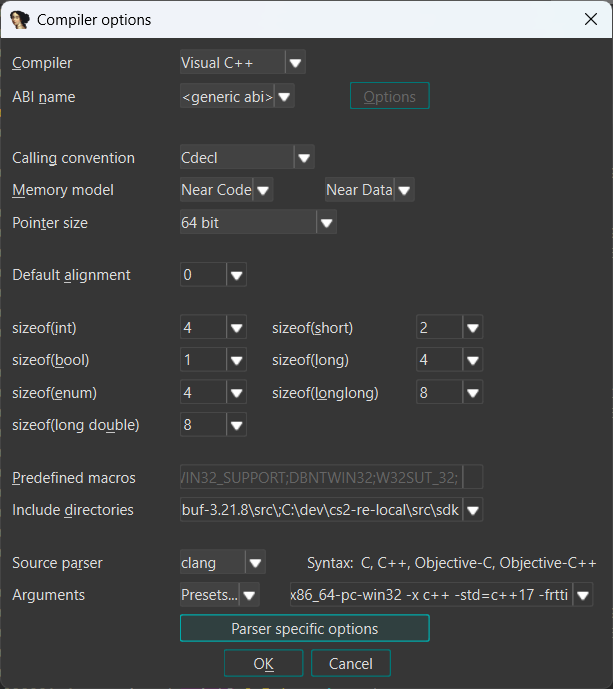 IDAClang Compiler window
Why IDAClang is #1 friend when reversing C++ code
For modern C++ reversing, disassembly-only or manual type declarations work right up, until they don't 😅.
Once you're dealing with complex class layouts, template-heavy code, and interfaces that span multiple modules, lack of types becomes a bottleneck. IDAClang helps because it parses C++ headers right away, and imports the resulting declarations into the IDB without you hand-translating everything into C structs.
For instance, take the following code:
// IMyClass is a pure virtual class
class CMyClass : public IMyClass
{
public:
  virtual void fn1(); // some virtual functions...
  virtual void fn2();
  virtual void fn3();

  char m_array[64]; // and some members...
  float m_float;
  std::string m_string;
};
Without IDAClang, you'd need to convert this into a C struct, which is doable, but error-prone and a lot of work:
// (Something along those lines)
struct CMyClass
{
  struct CMyClassVtable
  {
    // IMyClass methods...

    void(*fn1)(CMyClass* this); // some virtual functions...
    void(*fn2)(CMyClass* this);
    void(*fn3)(CMyClass* this);
  } *vtbl;

  struct CMyClassMembers
  {
    char m_array[64]; // some members...
    float m_float;
    // what do we even do with std::string? :(
  } members;
};
As you can imagine, this gets very tedious with complex class hierarchies or templates (where you'd end up inventing macro-based ABI approximations in C, which sucks 😀).
In practice the typical flow tends to look like this:
- You discover or refine a structure while reversing.
- You express that structure as C++ in a header alongside your growing type set.
- You re-import the umbrella header.
- You immediately get the updated type everywhere it applies.
The nice thing about this workflow is that you can import the headers of an existing large codebase once you make IDAClang behave close enough to the original compiler environment.
Pros and cons
Pros:
- If you're reversing a smaller portion of a subsystem, you can just import the rest of the codebase into IDA, and continuously work on reversing the subsystem with all of the already-existing types in place.
- The source of thruth of your reverse-engineering project now isn't just an IDA IDB file. It's the actual code.
- Great if you have to reverse an app that updates often. Take Valve's CS2 as an example.
Cons:
- When dealing with large codebases, you need to nail the compiler options and the environment perfectly for it to work. That might include the following:
- Compiler options.
- System/Compiler toolchain includes
- Macros
- System macros
- Built-in macros
- App-specific macros
- Toolchain version which the app used to be built against (if the project you're reversing was built on VS2003, you'd have to use that version of headers, msvc SDK and so on)
However, IMO, I still think that the pros largely outweight the cons. If you manage to nail the compiler options, macros and such correctly, you can just impot anything you want, without doing it in C, or manually in IDA's GUI, which is awesome. 😎
Lets now look into some more technical details about IDAClang.
A reproducible import strategy
The fastest way to get this stable is to resist the urge to first doing "import all at once" strategy. I'd recommend starting with a tiny entry header that includes at least one STL header (to validate MSVC/Windows SDK includes) and one project/SDK header (to validate your own include files). Once that minimal set imports cleanly, you can scale the entry header up into a proper umbrella.
Importing everything at once takes longer to debug because there will be longer compilation times, more errors, and such.
IDAClang arguments
As stated earlier, we'll focus on CS2's hl2sdk specifically.
CS2 (on Windows) use msvc and (persumably) C++ standard version 17. It also uses dynamic_cast a lot, hence the RTTI flag, and others:
-target x86_64-pc-windows-msvc -x c++ -std=c++17 -fms-extensions -fms-compatibility -frtti
Details about each flag:
-target x86_64-pc-windows-msvctells clang to assume an MSVC-like ABI and platform environment; if your headers were written for MSVC (orclang-cl), this is typically what you want.- Target triples are usually written as
<arch>-<vendor>-<sys>-<abi>. You generally don't need to overthink this if you already know the binary's target (e.g. Windows MSVC x64). - For more details, see the IDAClang docs
-x c++and-std=c++17(orc++20) should match what the header tree expects; if the SDK uses C++20 features and you import under C++17, you might get confusing errors / warnings.-fms-extensionsand-fms-compatibilityenable Microsoft-specific C/C++ language extensions for compatibility with MSVC. This is commonly needed for Windows/MSVC-oriented header trees.-frttiis sometimes needed if your headers use RTTI-heavy constructs or code paths gated on RTTI-related settings. If your imports work without it, you can omit it.
Include directories
Your include list must cover all dependency roots used by the imported headers. For instance, if the project you're importing uses include paths (e.g. in a Visual Studio project), you must include all of them, because the code expects it. On Windows that usually includes:
- MSVC toolset includes (STL)
- Windows SDK includes (usually at least
ucrt,um, andshared; sometimes alsowinrt/ C++/WinRT depending on what you include) - This includes the specific SDK version installed on your machine; mixing SDK versions (or mixing x86/x64 roots) is a reliable way to get weird errors.
- Your SDK or other project-specific code
- Any third-party dependencies (protobuf, fmt, etc.) if the headers reference them
The process is as simple as you can imagine:
- You set up a baseline: a header + initial compiler options + include list.
- For large codebases, it may take a second, and then you look at the output window.
- You fix the errors there (which are often, quite cryptic).
- Try again.
Sometimes you may run to some indeed, cryptic errors. Some of them we'll cover later on.
Finding MSVC + Windows SDK include paths
Some projects may require to pinpoint the exact Platform Toolset. For instance, these may include v141, v144, and so on.
In the case of hl2sdk, a community-maintained CS2 Source2 SDK, the platform toolset that works is v141. This toolset might ship with versions ranging from 14.10 - 14.16. Therefore the full version of the toolset might look like this: 14.16.27023.
Therefore, the SDK can be usually found here:
C:\Program Files\Microsoft Visual Studio\2022\Community\VC\Tools\MSVC\14.16.27023\include\
This is the path you'll want to import into IDAClang.
Cryptic defines and macros in large projects
Defines are a trap. It's very tempting to copy a huge list from some build system or somebody's pastebin, but defines don't just "fix parsing"; they select different code paths, enable different fields, and sometimes change struct layouts. If you import with the wrong define set, you can end up with a coherent-looking type graph that simply doesn't match the binary you're reversing.
Start with only what you need for parsing, and treat everything else as opt-in. For instance, CS2 (or hl2sdk) uses these mandatory macros for it to function properly:
#define COMPILER_MSVC
#define COMPILER_MSVC64
#define PLATFORM_64BITS
#define _WIN32 1
#define WIN32
Depending on your IDAClang version and configuration, macros like _WIN32 / WIN32 may already be predefined by the -target you chose. Before forcing them, check what IDAClang already defines, because defines can select different code paths and change layouts.
That said, project-specific macros like COMPILER_MSVC / COMPILER_MSVC64 (in this example, used by Valve's internal tooling) usually won't be predefined for you, so you typically need to define them manually to reach the intended header code paths.
Even more weird macros may include things like the following:
// hl2sdk may fail to compile without this if you include some specific headers
#ifndef NOMINMAX
#define NOMINMAX
#endif

// Or even
#define GOOGLE_PROTOBUF_INCLUDED_common_2fnetwork_5fconnection_2eproto
One common failure mode on Windows is an MSVC STL guard that complains about an unexpected compiler version (this often happens when your bundled clang doesn’t quite match what the installed MSVC headers expect). The clean fix is to align your toolset / headers as closely as possible; if your setup supports it, also consider setting an MSVC compatibility version (e.g. -fms-compatibility-version=...) instead of bypassing checks.
If you just need the headers to parse so you can import types, a pragmatic parser-only escape hatch is:
#define _ALLOW_COMPILER_AND_STL_VERSION_MISMATCH
Use this sparingly: it can hide genuine STL/CRT incompatibilities. For IDAClang imports it’s usually acceptable because you’re not producing an object file — you’re trying to get a consistent type graph — but treat it as a last resort and keep it scoped to your umbrella header.
As you can see, the whole process of importing a large codebase into IDA is a combination of configuration and a small number of targeted workarounds. You need to carefully address compiler errors with shims like these just to make parsing succeed. It isn't pretty, but you can end up with working C++ types from a large codebase (like hl2sdk) with tens of thousands of lines of code.
In practice, importing a large codebase is a mix of correct configuration (targets/includes/defines) and a small number of targeted compatibility shims. Keep those shims tightly scoped and documented so you can reason about what they change.
offsetof and protobuf-heavy headers
Another example of trying to import hl2sdk into IDA:
IDACLANG: nonfatal: hl2sdk\thirdparty\protobuf-3.21.8\src\google/protobuf/repeated_ptr_field.h:645:27: error: constexpr variable 'kRepHeaderSize' must be initialized by a constant expression
Hmm, that doesn't look good!
For some header trees (protobuf-heavy ones in particular), you can run into not a constant expression failures around offsetof. The usual reason is that MSVC's offsetof machinery (directly, or via CRT headers) ultimately relies on patterns involving reinterpret_cast-style pointer tricks. That works fine for MSVC in many contexts, but clang will not treat those expansions as a compile-time constant expression in the specific places protobuf tends to use them (e.g., inside static_assert, template parameters, or other contexts that require constant evaluation).
// protobuf code where it fails

struct Rep {
  int allocated_size;
  void* elements[(std::numeric_limits<int>::max() - 2 * sizeof(int)) / sizeof(void*)];
};
static constexpr size_t kRepHeaderSize = offsetof(Rep, elements); // <--- HERE
Here's how offsetof is defined in MSVC:
#if defined _MSC_VER && !defined _CRT_USE_BUILTIN_OFFSETOF
    #ifdef __cplusplus
        #define offsetof(s,m) ((::size_t)&reinterpret_cast<char const volatile&>((((s*)0)->m)))
    #else
        #define offsetof(s,m) ((size_t)&(((s*)0)->m))
    #endif
#else
    #define offsetof(s,m) __builtin_offsetof(s,m)
#endif
In that situation, we have two options:
- define
_CRT_USE_BUILTIN_OFFSETOF(specific to our toolchain here). - override
offsetofmacro with our own.
Replacing offsetof with clang's builtin form fixes the issue because __builtin_offsetof is designed to be a constant expression when the type/field are valid:
#define offsetof(TYPE, FIELD) static_cast<std::size_t>(__builtin_offsetof(TYPE, FIELD))
Important: treat this as a parser-only workaround. Put it in your umbrella header and guard it behind a dedicated macro (e.g. IDACLANG_PARSING) so it never leaks into real builds.
The umbrella entry header
This is the header which you will ultimately import into IDA. It is called an umbrella header because it mostly consists of other includes.
It typically contains:
- Platform/compiler defines for parser compatibility.
- Ordered includes for SDK and dependency headers.
- Targeted compatibility shims for known parse issues.
Here's an example of such header:
#pragma once

// =========================
// 1) Parser-only defines
// =========================

#ifndef _ALLOW_COMPILER_AND_STL_VERSION_MISMATCH
#define _ALLOW_COMPILER_AND_STL_VERSION_MISMATCH
#endif

#ifndef NOMINMAX
#define NOMINMAX
#endif

// ...

// =========================
// 2) Macro fixes / shims
// =========================

// If you hit offsetof() errors, you may do this:
#undef offsetof
#define offsetof(TYPE, FIELD) static_cast<std::size_t>(__builtin_offsetof(TYPE, FIELD))

// =========================
// 3) Known-good standard headers
// =========================

#include <cstddef>
#include <cstdint>
#include <type_traits>

// =========================
// 4) Your target headers (start small, then expand)
// =========================

// Start with a single "anchor" header.
#include "public/some_interface.h"

// Then add bigger groups.
#include "tier0/something.h"
#include "tier1/something_else.h"

// NOTE: can be also absolute, such as:
#include "/path/to/hl2sdk/public/interface.h"
Once you have a baseline, you continuously iterate: expand the umbrella header, import, fix the next failure, repeat.
This can take real effort for large codebases, but the payoff is huge: the decompiler starts reflecting the actual class hierarchies and template instantiations you're dealing with.
IDAClang needs the same inputs as a compiler
When an import fails (or "succeeds" but produces subtly wrong types), it's usually not an IDA problem but rather it's a configuration problem. IDAClang is effectively compiling headers for the purpose of building a type graph, so it needs the same three categories of inputs a real compiler does:
- Compiler/target arguments (language mode, target triple, and ABI configuration)
- Include directories (MSVC toolset + Windows SDK + your project/SDK roots)
- Preprocessor defines (builtin macros, and/or small compatibility shims)
If any one of those is off, imports become partial, noisy, or misleading; the last case is the one to fear, because wrong-but-plausible types will happily poison your decompiler output.
Final note
If your goal is faster reverse-engineering on C++ binaries, a high-quality IDAClang configuration is one of the best leverage points you can invest in: it front-loads some setup work, but pays you back every time you re-import types and the decompiler output gets a little less ambiguous.
If you're interested in more details about IDAClang, see the Hex-Rays docs.
Notes
- The version of IDA used was 9.3; it should apply to recent versions as well. IDAClang was part of the 7.7 IDA release.